Chain State Management
Understanding active state vs archival state in EVM chains, and node configuration options.
When running an EVM-based blockchain (C-Chain or Subnet-EVM L1s), your node stores blockchain state on disk. Understanding the difference between active state and archival state is crucial for choosing the right configuration.
State Types
Your node's storage requirements depend on which type of state you're maintaining:
| Property | Active State | Active State with Snapshots | Archival State |
|---|---|---|---|
| Size (C-Chain) | ~500 GB | ~750 GB - 1 TB | ~3 TB+ (and growing) |
| Contents | Current account balances, contract storage, code | Current state + state sync snapshots for serving peers | Complete state history at every block |
| Required for | Validating, sending transactions, reading current state | Same as Active State, helps other nodes bootstrap | Historical queries at any block height, block explorers, analytics |
| Sync method | State sync (fast, hours) | State sync, then grows over time | Full sync from genesis (slow, days) |
| Maintenance | Periodic pruning or resync recommended | Periodic pruning or resync recommended | None needed (intentional full history) |
Active State
The active state represents the current state of the blockchain—all account balances, contract storage, and code as of the latest block. This is what your node needs to validate new transactions and participate in consensus. When you bootstrap with state sync, you start with just the active state.
Active State with State Sync Snapshots
Active state with state sync snapshots is what your node accumulates over time after starting with active state. As blocks are processed, state sync snapshots are retained for serving other nodes that want to bootstrap via state sync. This causes disk usage to grow beyond the active state size. Running offline pruning periodically removes these snapshots while keeping your node functional. Most long-running validators operate in this state.
Archival State
The archival state includes the complete history of all state changes since genesis. This allows querying historical state at any block height (e.g., "What was this account's balance at block 1,000,000?"). Archive nodes are typically only required for block explorers, indexers, and specialized analytics applications.
Most validators and RPC nodes only need active state. Archive nodes are specialized infrastructure for historical data access.
State Growth Rates
Even with the same configuration, different types of state grow at different rates:
| Growth Type | Rate | Description |
|---|---|---|
| Archival state | ~[TBD] GB/month | Complete history stored at every block |
| Active state + snapshots | ~[TBD] GB/month | Active state + Snapshots every 4000 blocks for serving peers |
| Active state | ~[TBD] GB/month | Current blockchain state only |
Note
State sync snapshots are retained to help other nodes bootstrap. Even if you don't need archival state, these snapshots accumulate over time and increase disk usage.
Node Configuration Matrix
Your node's final state depends on two factors: how you bootstrap and whether pruning is enabled.
| Bootstrap Method | Pruning Disabled | Pruning Enabled |
|---|---|---|
| State Sync | Active + Snapshots (~750GB - 1TB) | Active State only (~500GB) |
| Full Sync | Full Archival (~3TB+) | Contradictory goals |
Key Insight
If you start with state sync and have pruning disabled, you will accumulate state sync snapshots over time but will NOT have full archival state. To get full archival state, you must do a full sync from genesis.
Choosing Your Configuration
| Use Case | Bootstrap | Pruning | Result | Disk Size |
|---|---|---|---|---|
| Validator | State Sync | Periodic | Active state, minimal disk | ~500 GB |
| Standard RPC | State Sync | Optional | Current state queries | ~500 GB - 1 TB |
| Archival RPC | State Sync | Disabled | Full state after sync point | ~750 GB - 1 TB |
| Block Explorer / Indexer | Full Sync | Disabled | Complete archival history | ~3 TB+ |
Archival RPC vs Block Explorer: An archival RPC started via state sync can answer queries from the sync point forward. For complete historical queries from genesis, you need a full sync.
State Growth Visualization
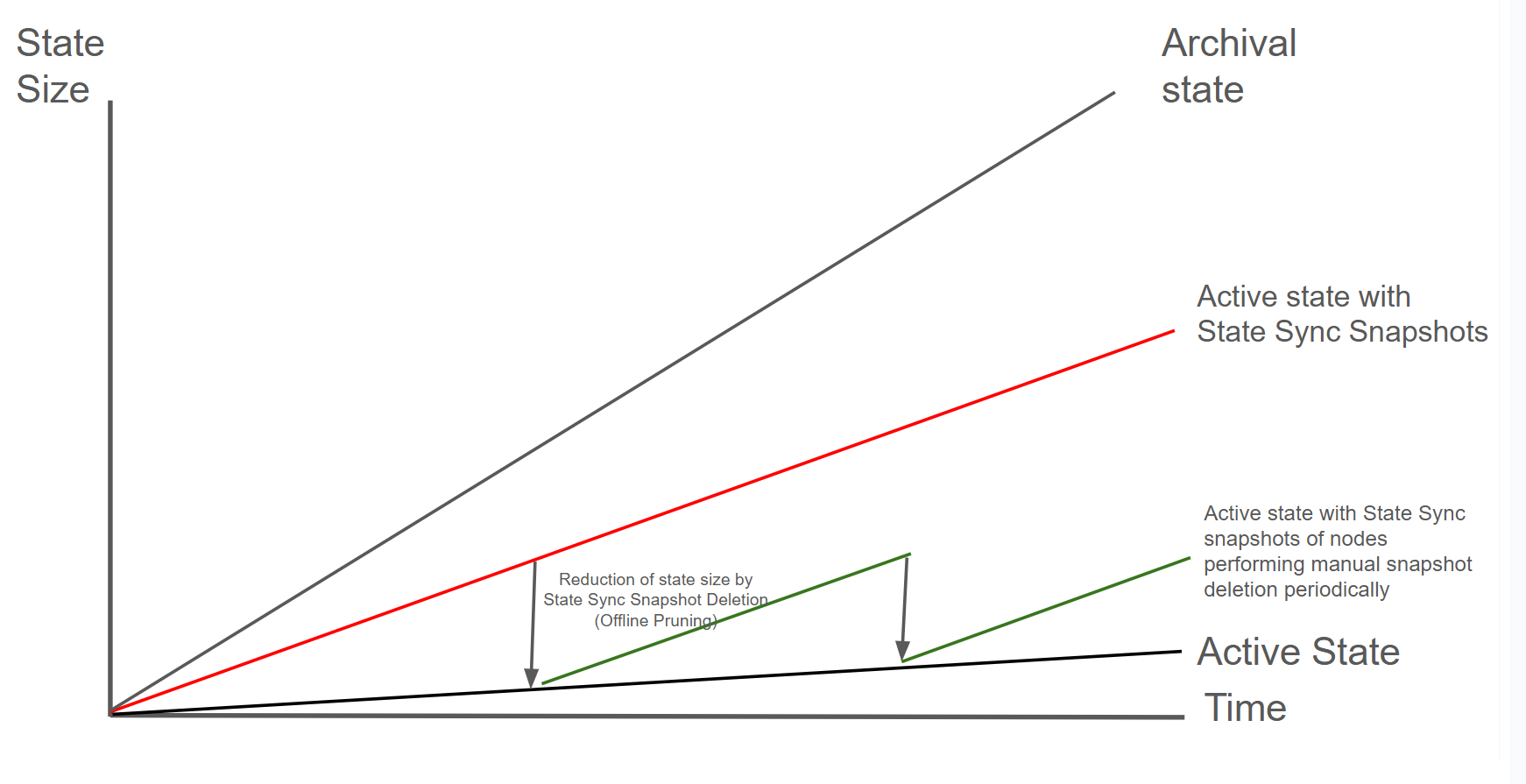
Understanding the chart:
-
Archival State (gray line): Grows fastest over time as it stores complete state history
- Includes all historical state changes since genesis
- Required only for block explorers, indexers, and specialized analytics
-
Active State with State Sync Snapshots (red line): Represents typical node disk usage over time
- Grows at a moderate rate as state sync snapshots accumulate
- This is what most long-running nodes experience without maintenance
-
Active State (black line): Grows at the slowest, steady rate
- Represents only the current blockchain state needed for validation
- This is your starting point after state sync
-
Active State with periodic snapshot deletion (green line): Shows nodes performing maintenance periodically
- After reaching active state, the node accumulates state sync snapshots over time
- When maintenance is performed, state drops back to active state level
- This sawtooth pattern represents the recommended maintenance cycle
Future Improvement: Firewood
Firewood is an upcoming database upgrade that will address the issue of state growing too large. This next-generation storage layer is designed to efficiently manage state growth and reduce disk space requirements for node operators.
New Validator State Sync Visualization
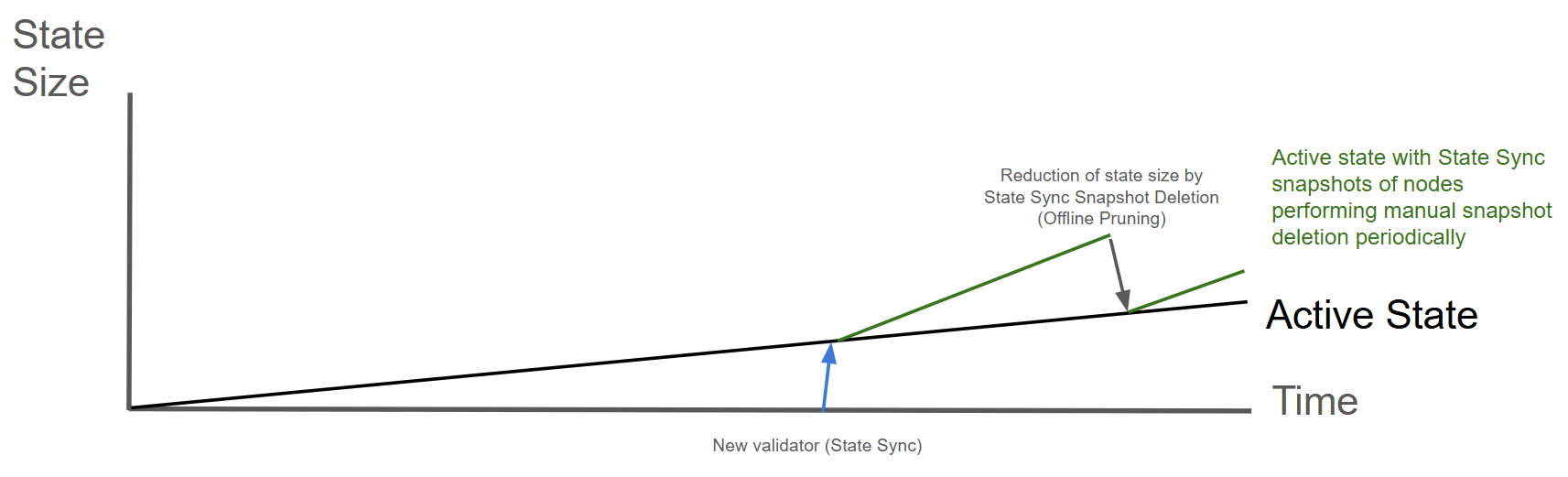
The following diagram illustrates the state lifecycle for a new validator joining the network:
Understanding the diagram:
- New validator (State Sync): When a new validator joins (blue line) via state sync, it quickly reaches the active state level
- Active State (black line): The minimal state required for validation
- Green line: After bootstrapping, the node accumulates snapshots. Periodic maintenance brings state back down
Managing Disk Usage
For nodes that don't need archival state, disk usage will grow over time as state sync snapshots accumulate. See State Size Reduction for options to reclaim disk space:
- Offline Pruning: Remove snapshots while keeping database intact (requires downtime)
- Fresh State Sync: Bootstrap a new node and transfer validator identity (no downtime)
Configuring State Sync
State sync is enabled by default for the C-Chain. For Avalanche L1s, you can configure it per-chain:
- C-Chain configuration: See C-Chain Config
- Avalanche L1 configuration: See Subnet-EVM Config
P-Chain and X-Chain State
The P-Chain and X-Chain have significantly smaller state footprints compared to the C-Chain:
- P-Chain: Stores validator metadata, Avalanche L1 definitions, and staking transactions. State size is typically < 10 GB and grows very slowly.
- X-Chain: Handles AVAX transfers using the UTXO model. State size is typically < 50 GB and grows slowly.
Important limitations:
- State sync is not available for P-Chain or X-Chain
- These chains always sync from genesis by replaying all transactions
- Bootstrap time is faster than C-Chain despite no state sync due to much smaller state size (typically < 1 hour)
- Disk space management is rarely needed for these chains
L1-Specific Considerations
For Avalanche L1s running Subnet-EVM:
- State size scales with usage: High-throughput chains accumulate state faster
- Same management options apply: Offline pruning and state sync work identically to C-Chain
- State sync available: Configure via Subnet-EVM chain config
- Plan storage accordingly: Reference the system requirements for your throughput tier
Is this guide helpful?